Browse articles
A tour of Home
Your plan at a glance, suggested sales moments for your regions, and what is coming up next.
1 min readUpdated
Home is where each visit starts. From top to bottom it shows your plan, suggestions, a few counters and the month ahead.
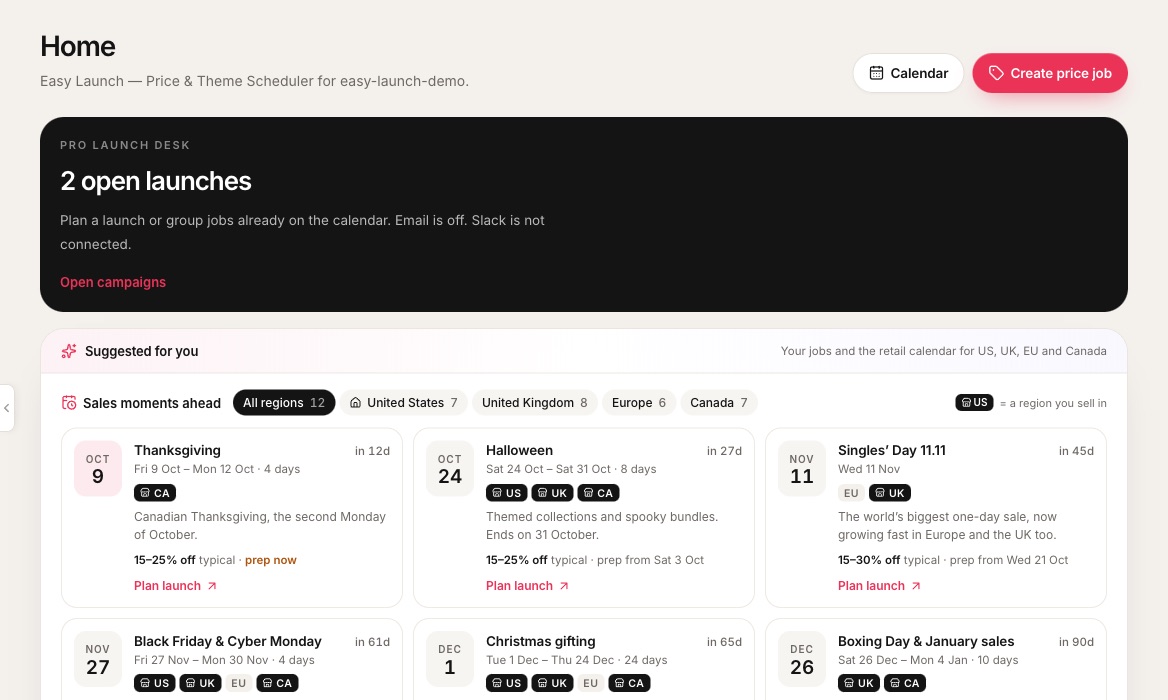 1Jump to the calendar or start a price job.2Plan banner. On Pro it is the launch desk with open launches.3Filter sales moments by region. The house marks your store’s region.4Dark chips with a shop icon are regions you sell in.5The start date of each moment. Tinted when it is time to prep.6Typical discount and when to start preparing.7Start a sale or launch with the details filled in.
- 1Jump to the calendar or start a price job.
- 2Plan banner. On Pro it is the launch desk with open launches.
- 3Filter sales moments by region. The house marks your store’s region.
- 4Dark chips with a shop icon are regions you sell in.
- 5The start date of each moment. Tinted when it is time to prep.
- 6Typical discount and when to start preparing.
- 7Start a sale or launch with the details filled in.
What each part does
- Plan banner. What your plan covers today and what the next plan adds.
- Suggested for you. Tips from your own jobs, such as a report to read, plus sales moments for your regions.
- Tiles. Next revert, price jobs in use, and launches or templates.
- Calendar. The month’s apply and revert times on Grow and Pro. Other plans see a preview of it and the next few jobs.
If a plan change has paused any jobs, an amber banner on Home links straight to them. See When your plan changes.
Related
Sales moments
Black Friday, Boxing Day and more, suggested for the regions you sell in, with a prep date for each.
The launch calendar
Every apply and revert on one month grid, in your store’s timezone.
Campaigns and the launch desk
Run prices, templates and product drops as one launch, with a checklist, a shareable brief and a report.