Browse articles
Pick products and markets
A job only touches the products and markets you tick. Everything else is left alone.
1 min read
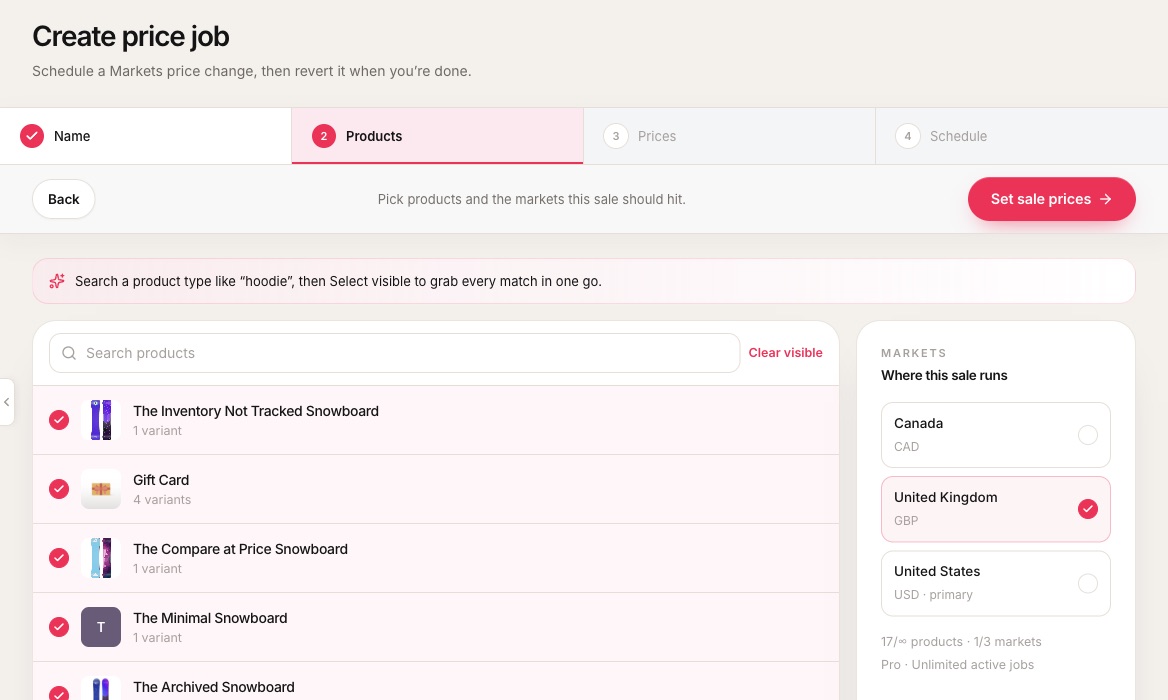 1Search, then Select visible grabs every match at once.2Ticked products. Every variant of a ticked product is included.3Tick every market the sale should reach.4How much of your plan this job uses.
- 1Search, then Select visible grabs every match at once.
- 2Ticked products. Every variant of a ticked product is included.
- 3Tick every market the sale should reach.
- 4How much of your plan this job uses.
- Search a product type like “hoodie”, then Select visible to add every match. Clear visible undoes it.
- Every variant on a ticked product is included. Unticked products are not changed.
- Each market must have an active catalogCatalogThe Shopify Markets catalog attached to a market. It carries the price list Easy Launch writes to. with a price listPrice listFixed prices for one market’s catalog. Sale prices go here, not into discount codes., or the job cannot write it. See Markets catalogs and failing points.
Every market
Included on Pro.
Free uses one market per job, with your primary marketPrimary marketThe market your store’s base prices belong to. Free jobs start with it selected. selected first. Essentials and up can use every market on the shop.
Related
Create your first price job
Four steps: name, products and markets, prices, schedule. Nothing changes in your store until the start time.
Markets catalogs and failing points
Each market needs a catalog and price list. The job warns you before it runs.
Plans and upgrading
Free proves one sale. Essentials opens every market, Grow the season, and Pro the full launch desk.