
Browse articles
Schedule and revert
The start time writes the sale. With revert on, the saved originals come back at the end time.
1 min read
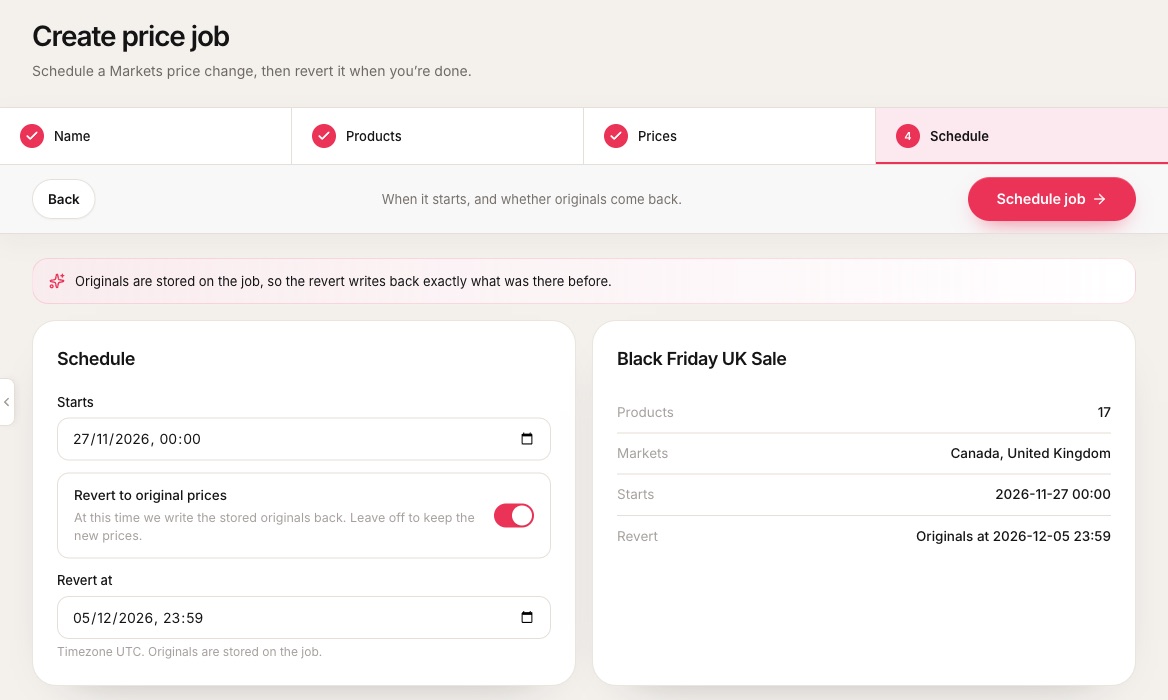 1When sale prices are written to each market.2Revert to original prices. Off keeps the sale prices until you revert by hand.3When the originals come back.4Summary of products, markets and times.
- 1When sale prices are written to each market.
- 2Revert to original prices. Off keeps the sale prices until you revert by hand.
- 3When the originals come back.
- 4Summary of products, markets and times.
- Start. Easy Launch writes the new selling and compare-at prices to each market’s price list.
- Revert. At the end time it writes the saved originals back. An end time only matters when revert is on.
- New jobs start with revert on or off according to Revert by default in Settings.
- Times use the timezone from Settings. Set it to the store’s local zone before you plan a launch week.
How far ahead you can plan
Plan months ahead
Included on Pro.
Free jobs must start within 7 days. The date picker stops there and Plan further out shows which plan lifts the limit. Essentials and up can schedule months ahead.
A start time in the past will not schedule. To go live right away, save the job and use Run now on its page.
Related
Job statuses and actions
What Scheduled, Paused, Active and the rest mean, and which buttons each one offers.
Store settings
Your plan, the timezone, scheduling defaults and alerts, all in one place.
When your plan changes
Cancelling keeps your paid days. Jobs that will not fit the next plan are paused, and resume if you reinstate.