Browse articles
Store settings
Your plan, the timezone, scheduling defaults and alerts, all in one place.
1 min read
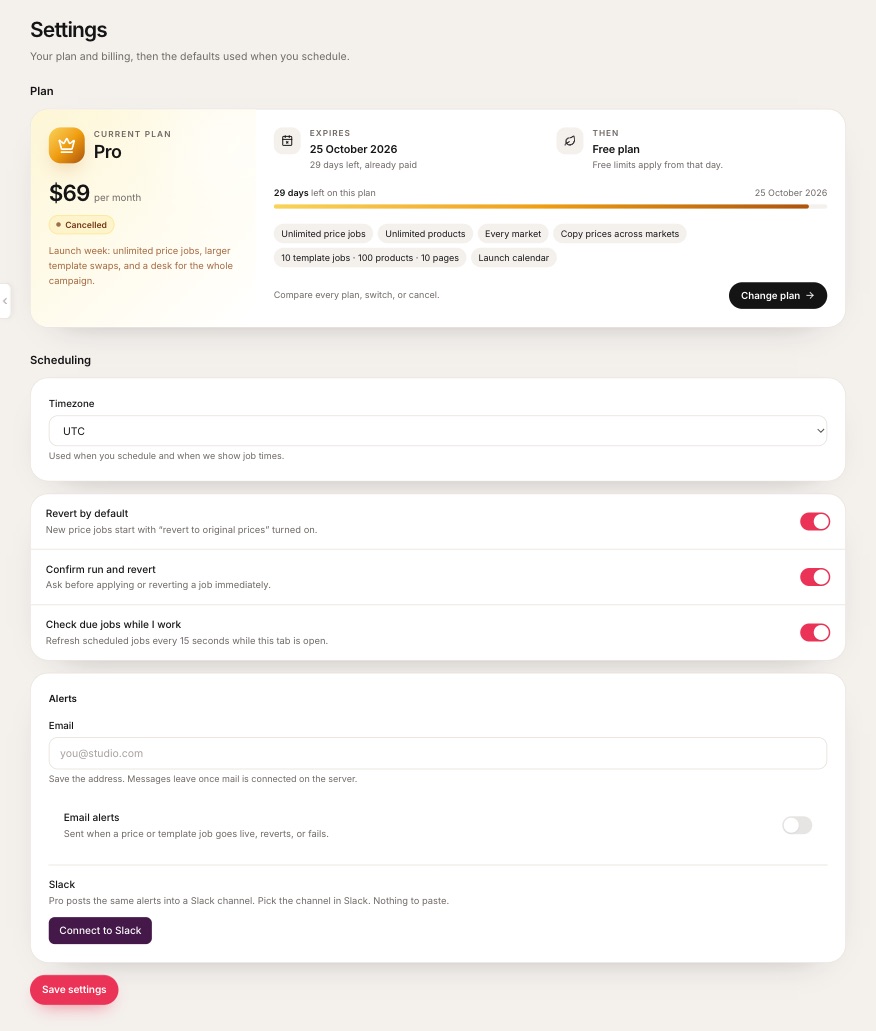 1When the plan renews or ends, and what comes next.2Timezone used for every time you pick or see.3New price jobs start with revert on.4The open tab checks for due jobs every 15 seconds.5Email alerts, on Grow and Pro.6Slack alerts, on Pro.
- 1When the plan renews or ends, and what comes next.
- 2Timezone used for every time you pick or see.
- 3New price jobs start with revert on.
- 4The open tab checks for due jobs every 15 seconds.
- 5Email alerts, on Grow and Pro.
- 6Slack alerts, on Pro.
| Setting | What it does |
|---|---|
| Timezone | Used when you pick start and end times, and wherever times are shown. |
| Revert by default | New price jobs start with “revert to original prices” on. |
| Confirm run and revert | Asks before Run now or Revert now. |
| Check due jobs while I work | While a tab is open, checks for due jobs every 15 seconds. |
| Email and Slack | Where alerts go. See Email and Slack alerts. |
Settings belong to this shop and never change your Markets catalogs. Press Save settings after changes.
Related
Schedule and revert
The start time writes the sale. With revert on, the saved originals come back at the end time.
Email and Slack alerts
Hear when a job goes live, reverts or fails. Email is on Grow, Slack on Pro.
When your plan changes
Cancelling keeps your paid days. Jobs that will not fit the next plan are paused, and resume if you reinstate.