
Browse articles
Selling and compare-at prices
Selling is what the shopper pays. Compare-at is the struck-through “was” price.
1 min read
Each row is a product and each column is a market. Every market has a Sale price and a Compare-at cell. The small red tag shows the saving shoppers will see.
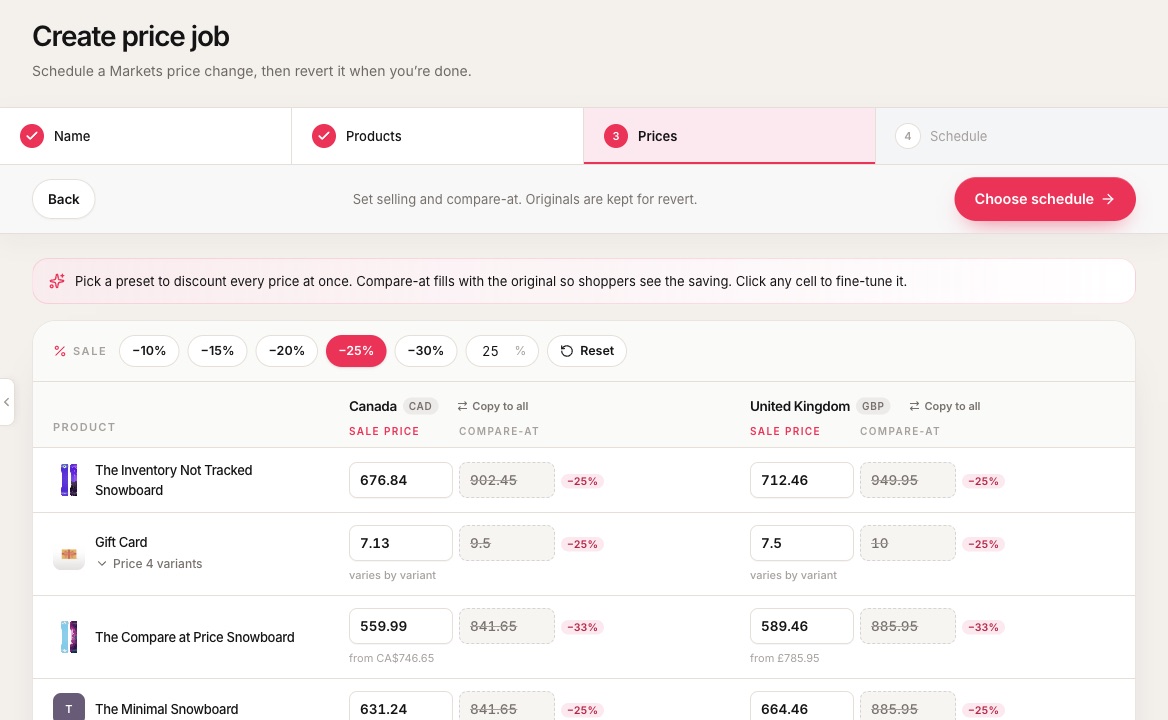 1Presets discount every price at once. Or type your own percent.2Reset puts every cell back to the live Markets prices.3Copy this market’s column to the other markets.4Sale price: what the shopper pays.5Compare-at: shown struck through as the “was” price.
- 1Presets discount every price at once. Or type your own percent.
- 2Reset puts every cell back to the live Markets prices.
- 3Copy this market’s column to the other markets.
- 4Sale price: what the shopper pays.
- 5Compare-at: shown struck through as the “was” price.
Presets and single cells
- Presets (−10% to −30%, or your own percent) take the percent off the current live selling price.
- Click any cell to fine-tune it. Products with several variants can be priced together or opened one by one.
- Reset puts the grid back to the live Markets prices loaded with the job.
Blank cells
A blank cell means that market has no catalog price for that variant yet. Easy Launch never copies another market’s price into it. Leave it blank, or type a number only if you want to create a fixed price there.
OriginalsOriginalsThe prices or templates saved on the job before anything changes. Revert writes these back. are saved when you build the job. Revert writes those saved prices, not whatever happens to be live at the end.