Browse articles
Campaigns and the launch desk
Run prices, templates and product drops as one launch, with a checklist, a shareable brief and a report.
Campaigns
Included on Pro.
A campaign groups the jobs behind one launch, such as Black Friday, on a single launch deskLaunch deskThe Pro campaign page that holds a launch’s price window, template window, checklist, brief and report.. You can start one in two ways.
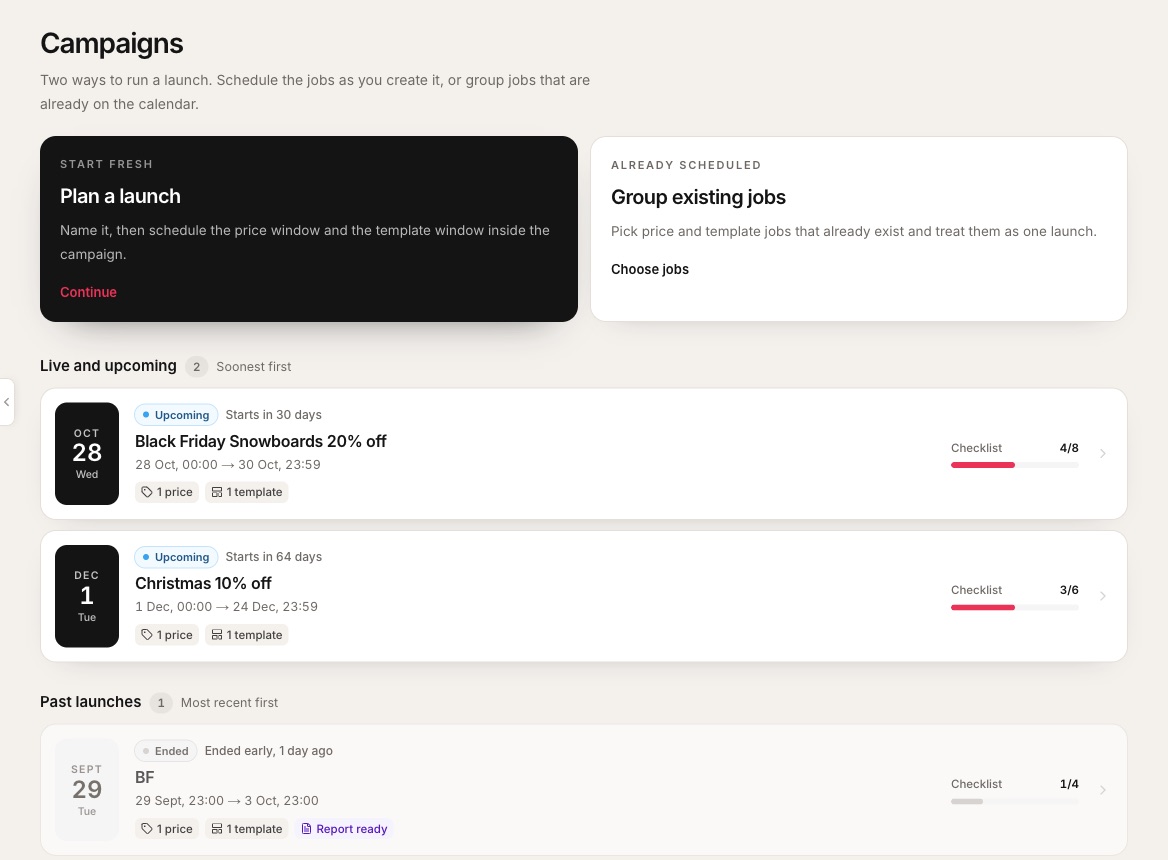 1Plan a launch: describe it and the assistant drafts a name, notes and checklist.2Group existing jobs that are already on the calendar.3Live and upcoming, soonest first.4Start date. Dark while upcoming, red when live.5Phase badge and how long until it starts or ends.6Checklist progress.7Past launches show when the end report is ready.
- 1Plan a launch: describe it and the assistant drafts a name, notes and checklist.
- 2Group existing jobs that are already on the calendar.
- 3Live and upcoming, soonest first.
- 4Start date. Dark while upcoming, red when live.
- 5Phase badge and how long until it starts or ends.
- 6Checklist progress.
- 7Past launches show when the end report is ready.
Add a price or template job to give it dates.
Readiness check runs an hour before the start.
Alerts go out as each job goes live.
Report ready. “Ended early” if you end it by hand.
On the launch desk
- Price window, template window and product drop. Add the jobs that make up the launch. Each one opens its usual form and brings you back to the campaign.
- Check this launch. A readiness checkReadiness checkA read-only look through a launch’s jobs for missing products, prices, times or templates. It also runs by itself an hour before the start. that changes nothing. It also runs by itself an hour before the start.
- Launch checklist. Tick items off, drag to reorder, and add your own. It saves as you go.
- Copy brief link. A read-only page with the countdown, prices by market, template swaps, drops and checklist. Anyone with the link can view it, no Shopify login needed.
- Copy calendar link. A team calendar feed for the launch.
- Copy to next year. Starts next year’s launch from this one.
- End launch now. Cancels scheduled and paused jobs, reverts live ones, and writes the report.
Related
Sales moments
Black Friday, Boxing Day and more, suggested for the regions you sell in, with a prep date for each.
Schedule product and page templates
Point selected products or pages at another template on the live theme, then switch them back.
Email and Slack alerts
Hear when a job goes live, reverts or fails. Email is on Grow, Slack on Pro.