
Browse articles
Create your first price job
Four steps: name, products and markets, prices, schedule. Nothing changes in your store until the start time.
Go to Price jobs → Create price job, or press Create price job on Home. You can go back to any finished step without losing what you entered.
- 1
Name it, or describe it
Type a name you will recognise later, such as “EU BFCM 20%”. Or describe the sale in one sentence and press Draft. The assistant fills in every step for you to check.
- 2
Pick products and markets
Search the catalog and tick products. Tick every market the sale should reach on the right.
- 3
Set prices
Pick a preset such as −20%, or type into single cells. Compare-at fills with the original so shoppers see the saving.
- 4
Schedule
Choose the start. Leave Revert to original prices on and pick when the originals come back. Press Schedule job.
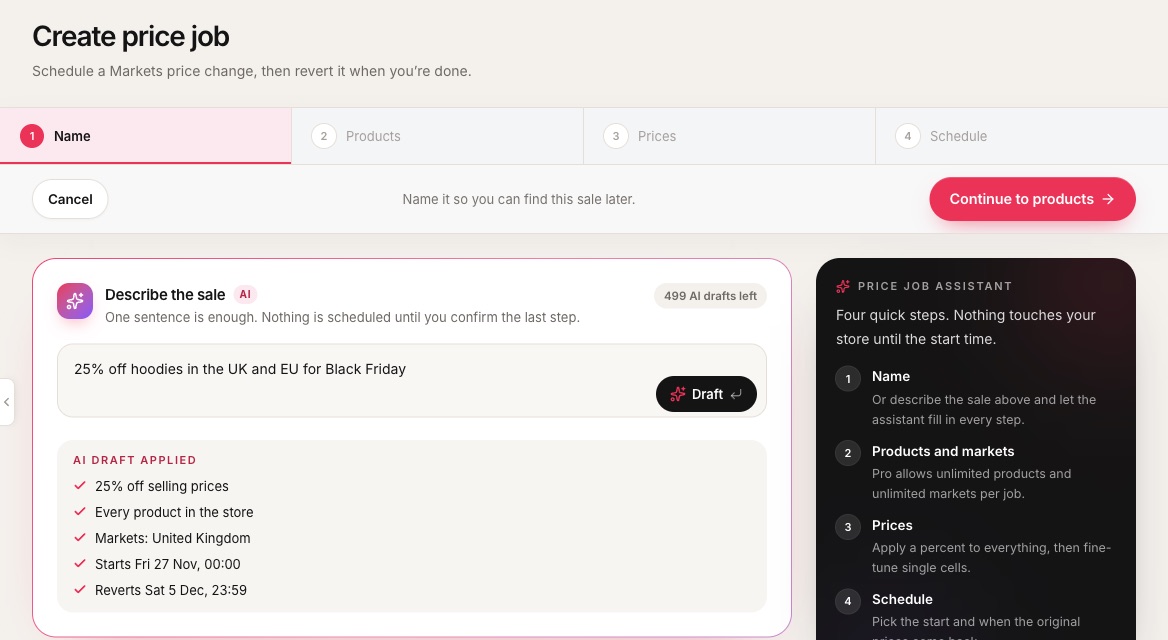 1The four steps. Finished ones show a tick and can be reopened.2Describe the sale in plain words.3AI drafts left this month on your plan.4What the draft filled in: discount, products, markets and dates.5Continue to the next step.
- 1The four steps. Finished ones show a tick and can be reopened.
- 2Describe the sale in plain words.
- 3AI drafts left this month on your plan.
- 4What the draft filled in: discount, products, markets and dates.
- 5Continue to the next step.
If something would stop the job running, a failing pointFailing pointA problem found before a job runs, such as a market with no catalog. “Cannot run” blocks the job; “Warning” does not. appears before you can schedule. Examples are no catalog on a selected market, more products than your plan allows, or a start time in the past. Fix the row or untick that market.
On Free
Free includes one price job a month in one market, with up to ten products, starting within the next 7 days. The allowance resets on the 1st, and deleting a job does not give it back.Related
The drafting assistant
Describe a sale, swap or launch in one sentence and the assistant fills in the form for you to check.
Pick products and markets
A job only touches the products and markets you tick. Everything else is left alone.
Selling and compare-at prices
Selling is what the shopper pays. Compare-at is the struck-through “was” price.
Schedule and revert
The start time writes the sale. With revert on, the saved originals come back at the end time.